Blog

WIRED AU – New Royalty-Free Record label

A lot of restaurants and businesses ask us for the best solution to broadcast music in their shops without having to worry about getting a licence from the record company, ARIA and/or from AMCOS.

The purchase of a CD or a Spotify subscription only gives you the right to play the music privately, and to pass on the same physical disc to another person.  The Copyright Act allows you to “format shift” music for personal use, for example, to copy from CD format to MP3 format in certain limited situations. However, this does not extend to use of the music on commercial premises. 

That’s why we created a Royalty-Free Record Label we will use to source the best locals artists, sign them and let you broadcast it for free in your shops.

It’s still a work in progress with only a few songs but until then we also found the best royalty free music already signed and created Spotify playlists you can stream worryfree.

The New Era of TV Voice Control

“Alexa, write me an article about voice-controlled TVs.”

Ok, so we’re not quite at that point yet, but it’s only a matter of time.

Voice control for TV has been a fast evolving feature on phones and tablets but the move to TVs has been a slower process – until now.

Here’s what the TV landscape looks like right now.

Most major TV brands are either using Google Android, Amazon Fire systems, or making their own systems compatible with these two software.

Brands like Samsung, Sony, Panasonic and LG all carry models that use Google Assistant and Amazon’s Alexa.

These systems not only allow you to control your TV with voice commands, they also open up a new world of functionality that can even extend to other devices in your home.

Let’s take a look at how it all works.


A Quick Recap of Voice Control

Voice control is a system where artificial intelligence (AI) uses speech recognition to understand our verbal instructions and to carry them out.

The beauty of advanced AI with speech recognition is that you can talk to it like you would a person.

Speech recognition software works with a range of accents, understands casual conversations, and can handle most common slang. It even learns as you use it, becoming better at understanding you over time.

Today’s AI can perform complex multi-part tasks almost instantly, such as finding the highest-rated restaurant within a 5km radius.


Voice Control for TVs

LG & Samsung
LG has voice control through its own speech-recognising AI called ThinQ, as does Samsung with its equivalent – Bixby.

Both of these companies have made their systems compatible with Google Assistant and Alexa to extend their  functionality and compatibility with other Google and Amazon devices.

Sony
Sony doesn’t have its own on-device AI but does produce Android TVs which allow voice control through both Google Assistant and Alexa.

Panasonic
Panasonic has a more round-about method. First, you’ll need to invest in a compatible smart speaker. Then you can download the Google Assistant or Alexa apps onto the TV which can be set up to allow voice control through the speaker.

Regardless of how they get there, the end result is the same – the TVs will do what you tell them to do.


Who needs the remote anymore?

Voice commands handle all the usual functions of a remote like changing channels and adjusting volume and brightness.

They also cover fiddly tasks like setting a series to record or having your TV switch automatically to your favourite show when it’s on.

But the tech is more than just an upgrade on control, it completely changes the way you navigate content.


The New Way to Navigate

With powerful AI handling all your instructions, you have a lot of room to improvise.

You’re not limited to naming shows or channels. You can search for content and give commands using information like cast members, scheduling, networks, and program content.


For example: “Put on that superhero movie with Ryan Reynolds and Josh Brolin” is actually something you can say to your TV now.


Voice Control All Your Apps Too

Once we sat with our eyes glued to the TV. Then they were glued to our smartphones. In 2019, they return to their home screen thanks to the ability of TVs to host voice-controlled applications previously limited or better suited to smartphones.

Consider the Youtube app.

It looks a lot better on TV, but having to search by typing with the remote is usually more trouble than it’s worth. With voice commands, that problem no longer exists, so now you can watch famous people eating hot chicken wings in 4k to your heart’s content.


Talk to Other Devices through Your TV

TVs with Amazon or Google technology can interact with other compatible devices in your home, meaning things like lights, speakers and even kitchen appliances can all be controlled with voice commands to your TV.


Yes, you can already do this with smartphones, but what about when you’re all comfortable on the couch and realise your phone is charging in another room? First world problem solved.

It’s now quickly becoming a question of what can’t be done with voice commands than what can.

With all the major players adopting voice command technology, 2019 is shaping up to be the year voice controlled TVs take over the market – and maybe also the world.

Check out our range of TVs here


Interactive Projector for Classrooms

Lately, we’ve been going back to school a lot, carrying tool belts instead of school bags.

And boy, have things changed…

Back in the day, the rare sight of a TV in the class would cause a mass freak out of uncontrollable joy. Now, we’re installing fancy interactive projectors for schools and seeing iPads and laptops everywhere.

Today’s classroom actually looks fun, and to be honest, we’re a little envious


Teaching digital natives

Kids today are called ‘digital natives’ because they’ve never known a world without tablets, laptops, smartphones and high-speed internet.


If only they knew the horrors of dial-up internet…

According to Mark Prensky, the fella who coined the term ‘digital natives’, today’s students think and process information in a completely different way to generations before.

No surprise really.

Kids aren’t engaging with content passively like we used to. They’re sharing, commenting, altering, adding filters and captions and scribbles to all kinds of information.

Outside of the classroom, their world IS technology. So it makes sense that technology is playing a bigger role inside the classroom.


The flipped classroom

Teaching methods have evolved because kids are craving dynamic styles of learning. In recent years, we’ve seen a movement where teachers are abandoning traditional methods for a style known as the ‘flipped classroom’.

As the name suggests, things are flipped.

What a student would normally learn in the classroom is now learned at home through pre-recorded lectures and videos while classroom time is devoted to interactive, active learning through activities like group problem-solving and games.

In a sense, the classroom looks more like a workshop where students have the opportunity to inquire, collaborate and gain a deeper understanding of topics.

When more time is spent applying information, that’s when information becomes knowledge.


Please welcome the newest member of the class – the interactive projector


To create this workshop environment, schools have looked to adding technology such as interactive projectors.

But what exactly is an interactive projector?

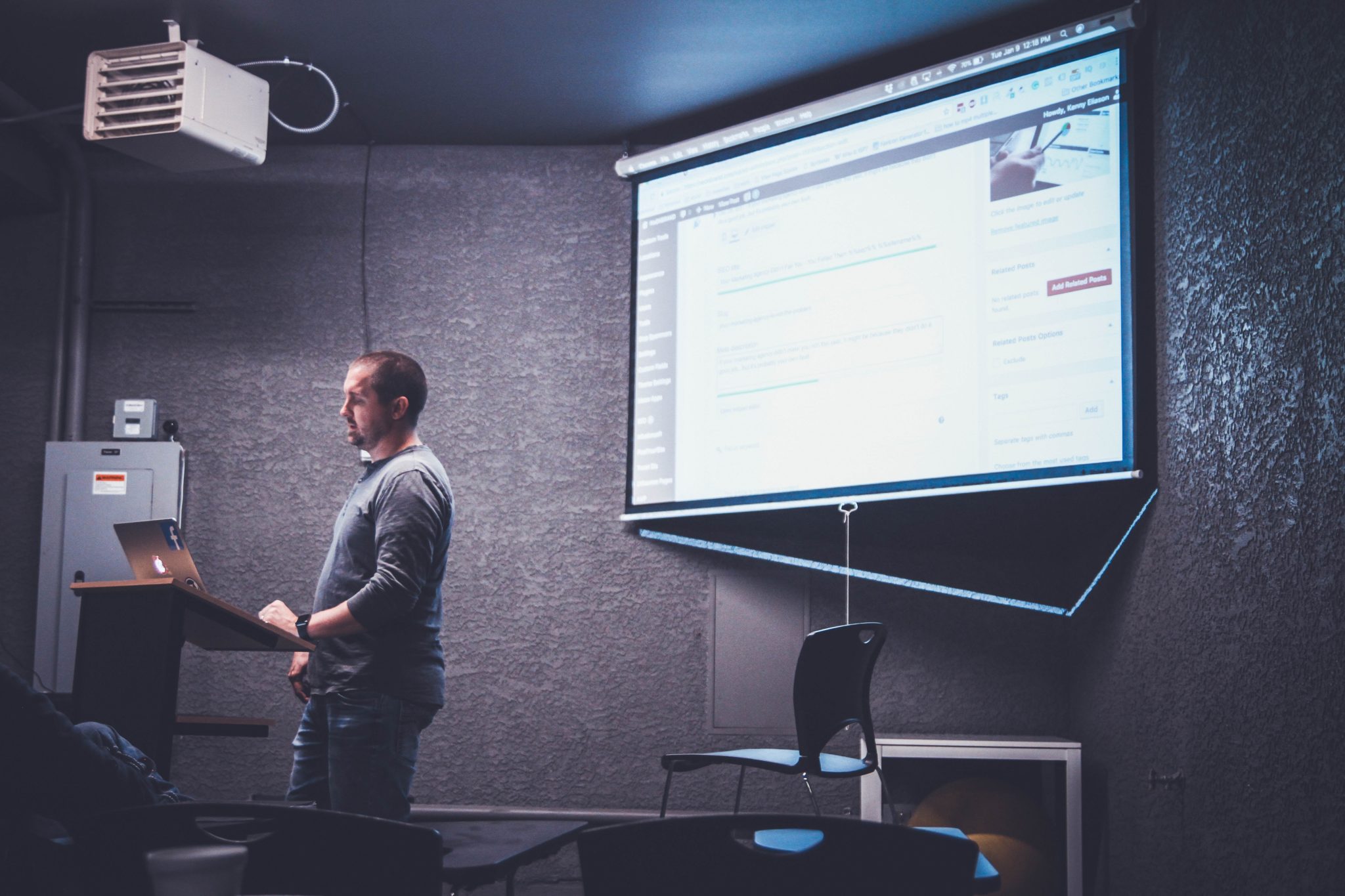
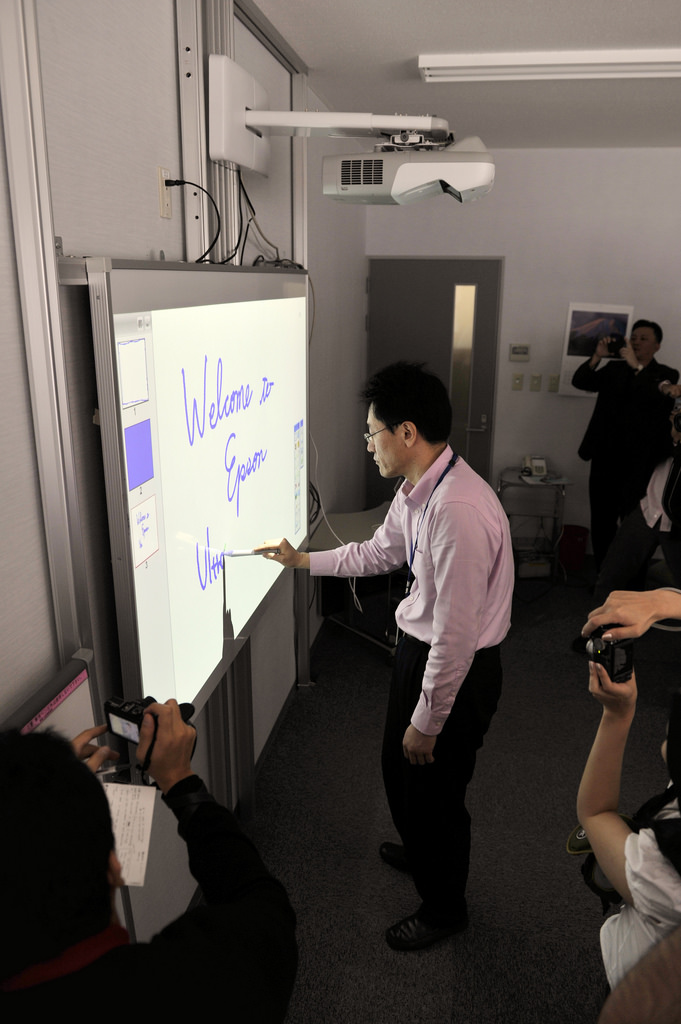
An interactive projector turns any flat surface like a plain wall, whiteboard or tabletop into a large, interactive canvas for learning.

Unlike a normal projector, you can actually interact with the displayed content using a stylus or even with your fingers. This is made possible by tech such as infrared or digital light processing that can track movements when contact is made with the surface.


How a digital projector transforms a classroom

1. Improves engagement
Learning through physical movement (also known as kinesthetic learning) keeps students more engaged.

There’s an irresistible drawing power when interactive projectors like the Epson EB-695Wi can let students co-create by altering, annotating and interacting with learning materials.

2. Encourages collaboration
Studies have shown that being able to work on a problem in a team can improve retention and engagement. A lot of our interactive projector Epson models carry dual   pen capabilities meaning students and teachers can contribute to content at the same time.

And it gets even better.

In today’s BYOD (bring your own device) classrooms, teachers can connect up to 50 laptops, tablets or smartphones to the interactive projector via the network. So imagine sending questions to student devices, receiving their answers back and then displaying particular answers for discussion.


3. Lets you teach on a BIG screen

It lets you teach your lesson plan in ultra bright HD on a very big screen.

Without getting too technical, there’s a term called ‘throw’ which is the amount of distance needed between the projector and the flat surface that you’ll be using to view content.

We carry interactive projectors with ultra-short throw presentation displays. This means you can get a 100” image from as little as 28cm away with next to zero shadow interference.


4. Reduces the annoyance of note-taking

Note taking is a pain for everyone involved. As the teacher, taking too long to write notes out for students to copy means you risk losing their attention. As the student, there’s nothing more disengaging than copying words down for half the lesson.

Interactive projectors have file sharing capabilities that lets you share your notes digitally at the end of the lesson.  


So what can your lessons look like?

Put it this way… they can be so fun and creative that they won’t even look like lessons.

We’ll be taking a closer look at the possibilities soon but here’s a taster.

Explore sites without leaving the classroom

Thanks to Google Earth and virtual tours, you can take students on tours through the ancient ruins of Pompeii, the Louvre Museum, and anywhere imaginable on earth.


Spice up your PE class

In 2017, a teacher in America uploaded a video of one of his gym class exercises. It’s now sitting at over 81 million views.


A game app was downloaded onto an iPad which was then wirelessly displayed on the wall using an interactive projector.

Thanks to tech and a bit of imagination, this teacher has completely reinvented the game of dodge ball. By throwing balls at virtual bugs on the wall, no one gets hurt but everyone still gets to work up a sweat.

PE teacher of the year anyone?

Tech like interactive projectors is no longer just a fun, shiny toy that would be great to have in the classroom. It’s fast becoming a necessity.

Outside the classroom, kids are navigating the world through technology.

A classroom that struggles to keep up with the learning behaviours of kids today runs the risk of hindering their learning development.

Bring your classroom to life by checking out our interactive projector installation packages or speak to one of our experts on 1300 556 212.

Wall Mount TV Ideas for Living Rooms

We’re known as being handy.

Fair enough considering we walk around with tool belts around our waists drilling holes, performing magic with cables and turning grunt work into works of art.

But… we’re also pretty trendy and we happen to know a thing or two about interior design.

See, we’ve been doing this for a long time. We’ve helped hundreds of people across Melbourne plan, design and build their dream entertainment area.


And we understand that a TV wall mount can be daunting

Especially when the whole design of our living space depends on it.

So here’s what we’re going to do. We’re going to unclip our tool belts and release the interior designers in us more often.


If your TV mount is not well thought out in relation to your décor (we used an accent mark so now you know we mean business…), it’ll stick out like a sore thumb. But when it works… it really is a thing of beauty.

Here are some ideas to help you design the perfect TV wall mount.

Create a Feature Wall

Inside a cinema, you’ve only got one thing competing for your attention – a big screen at the front. But your living space is a lot busier and it’s easy for your TV to get lost in the crowd.  

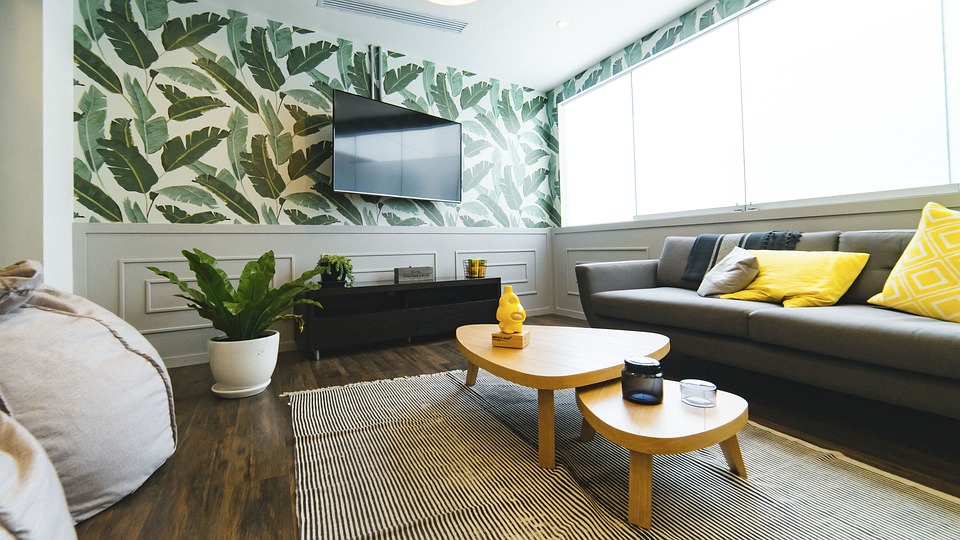
What you want to do is draw attention to your TV and one of the best ways of doing this is by using a feature wall. This creates a focal point for your TV.

If the surrounding space uses light colours, play around with contrasting colours for the feature wall.


A powerful accent colour like brown can really make the viewing wall pop.

Feature walls can be quite functional too with shelf space to display your speakers or ornaments.

Express yourself with wallpaper

A feature wall helps you make a statement, but it doesn’t always allow you to inject your personality into your viewing space.

Enter the wallpaper. It’s a lot easier to add your own character when there’s so many colours and creative designs to choose from.


We really dig this plantation-themed wallpaper. It’s a beautiful contrast to the rest of the space while matching the pot plant.


Other Ways to Deal with Visual Clutter

We’re all for minimalism but sometimes you just HAVE to show off your paintings, photos, ornaments and other furniture pieces alongside your TV.

Here’s a clever way to minimise visual clutter.

Simply rearrange these elements so that they form a border around your TV. Hang framed photos of different sizes and at different heights. There’s no need to be symmetrical here.


Let it all float

A wall-mounted TV gives off the appearance that it’s floating so it makes perfect design sense to complement your floating TV with floating furniture.


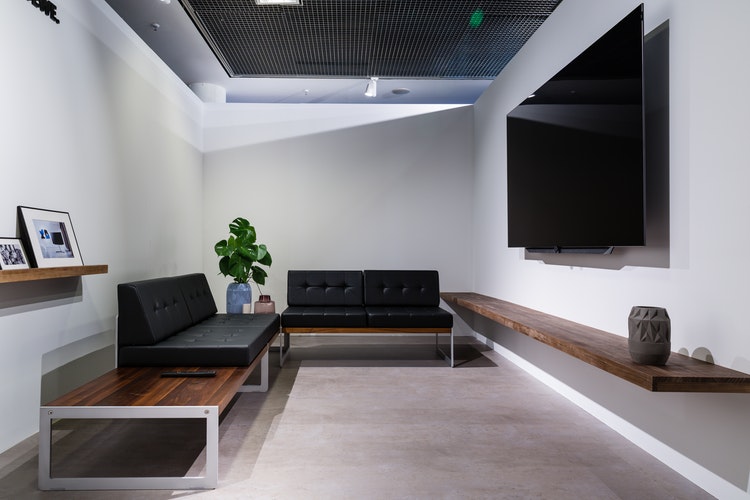
Here’s a good example of a TV mount with shelf. Raising shelves and cabinets off the ground will give your room a cleaner, sleeker and more spacious look.


Recess The TV

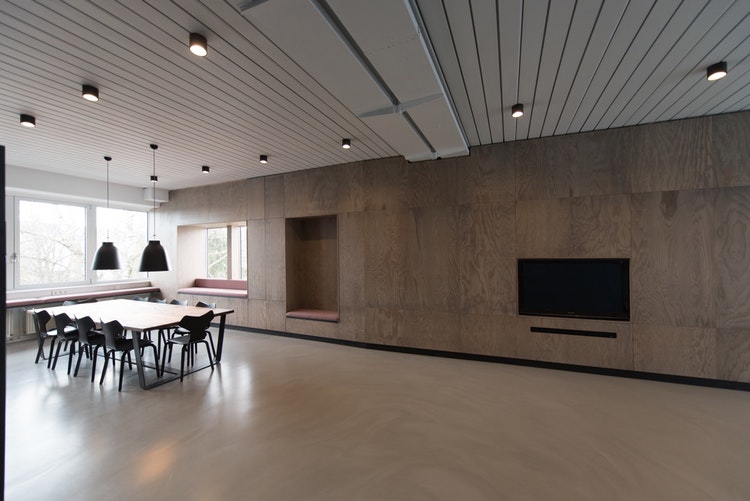
A TV wall mount can give you a sophisticated look. But you can always go a step further and set the TV back into the wall or a panel so that it all looks like one piece with nothing tacked on.

You can recess your TV with a smooth, perfect seal but we’ve also seen people leave a gap around the edge for some atmospheric accent lighting.


Above the Fireplace

Another popular TV mount is above the fireplace. It’s not going to be suitable for everyone and there are some things to keep in mind which we’ve covered here. If you are able to go with this arrangement, there’s no denying how sophisticated it looks.


Hang it like art

Anything on the wall becomes an artwork essentially. For us, this is the ultimate tribute to a beautiful looking TV – to hang it inside a shadow box frame.

What a beauty.


These are just some of the trending
wall mount TV ideas for living rooms.

Wherever your creativity takes you, we’re ready to put our tool belts back on to install your TV perfectly. Call us on 1300 556 212 or check our TV installation packages to get started.

Outdoor TV Mount

So lately we’ve had a lot of people asking us about the possibility of getting their TVs mounted outdoors.

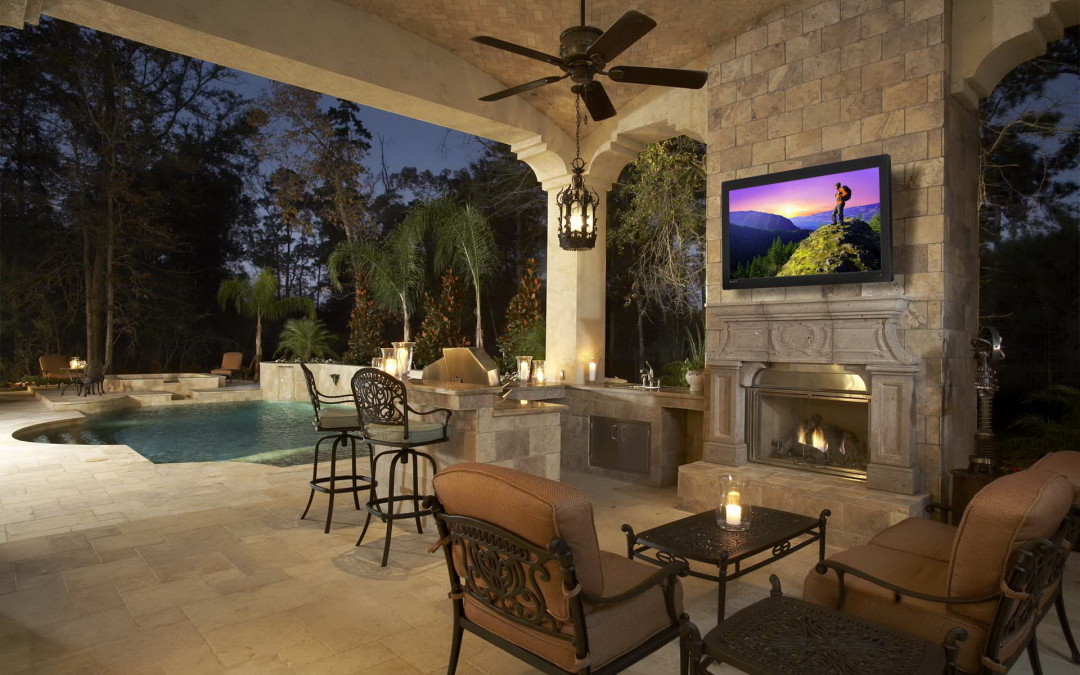
These people know how to enjoy life. And so can you because moving the screen action outside is very doable these days.


Yes, Summer is winding down. And it’s Melbourne we’re talking about.

But… imagine never needing to drop your tongs every second to run inside and check the game,
…imagine smelling delicious sizzling snags while watching delicious plays on the field,
…imagine snuggling up to a movie with your outdoor pooch,
…imagine snuggling up to your own outdoor cinema underneath the stars,
…imagine a big screen TV in your bustling beer garden…you get the picture.

Here’s how to make the great migration.


I’ve got a spare TV inside. Can’t I just move that outside?

Not quite. See, not all TVs are made equal and regular TVs simply can’t stand up to the elements outside. Even if your TV will be undercover, it still needs to contend with temperature extremes, humidity, condensation, salt air if you live near the sea, dust, insects etc.

The good news is… there are actually TVs purpose-built for the outdoors.


Benefits of outdoor TVs

Picture Quality
There’s going to be a lot of glare outside so you’ll need a TV that’s bright enough to counter it. Outdoor TVs can almost double the brightness of regular TVs for a much better viewing experience.

Durability
Outdoor TVs are designed to be weatherproof. They use a multi-fan airflow system to keep the insides cool and dry and internal heaters to protect the TV when the temperature drops.

Safety
Regular TVs become an electrical hazard if it’s in a wet outdoor environment. Outdoor TVs are designed for safe operation with power cords rated for outdoor use.


Next, you’ll need an
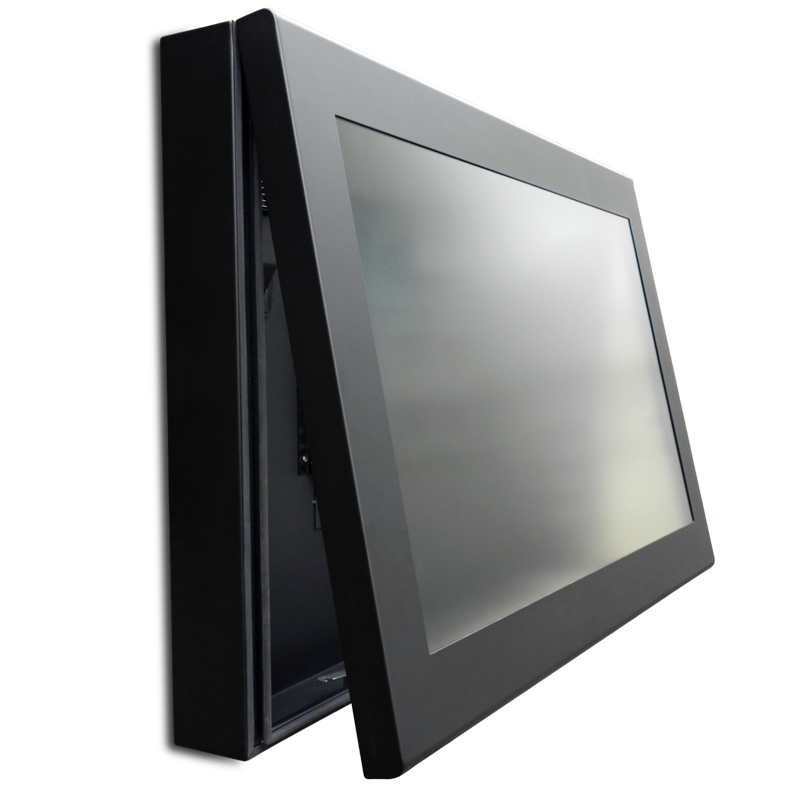
outdoor TV enclosure

Outdoor TV’s are pretty tough but it’s important to add another layer of protection.

You might be familiar with the IP rating system. Your smartphones and the covers you buy for them are all IP rated to indicate how much protection they offer against water and dust. Same concept here.

IP-rated outdoor TV covers give your display the greatest protection against extreme temperatures, water and dirt. It’s also a great safeguard against theft, vandalism or the stray tennis ball (six and out!)

Where to place your TV

The best spot for your outdoor TV mount is one that doesn’t get a lot of direct sunlight. If you don’t have any shaded areas, then the next best thing is to mount your TV facing southward. This ensures your screen gets the least amount of sunlight over the day.


Which mount to use

For outdoor viewing, we always recommend keeping your TV as flexible as possible.

A full-motion mount (also called articulating TV mount) is the way to go. It’ll allow you to tilt your TV up or down or swivel left or right. That way, you can direct the screen towards the patio, the pool or BBQ area.


Turn that outdoor area into another room

Let’s face it, a room with a TV screams fun. It brings people together. Put one outside and the great outdoors becomes a bonus room.


In a home, you’ll be spending much more quality time outside with family, friends and furry pets. In a pub, restaurant or office, it’ll be a talking point and a crowd-pleaser.

Chances are, you’re going to want a decent set of speakers and you’re going to want to connect your TV to several devices. Depending on your specific needs, our team can tailor the perfect solution for your outdoor TV mount.

Ready to make the great migration? Call us today on 1300 556 212.

Digital Signage Solutions in the Workplace

Yes, adding digital signage displays will make your workplace appear cooler, sexier, sleeker and more fun.

But it’s also much more than that.

What if we told you it can profoundly reshape your company culture and boost your revenue?


The Employee Experience

Last year in Forbes, brand-building expert Denise Lee Yohn declared 2018 “The Year of the Employee Experience”.

The employee experience is the sum of all the interactions an employee has with their employer from the time they apply for a position to their last day at the company.

This includes all the things the employer provides like…

  • The physical workspace
  • Tools and technology to do the job
  • Recognition and appreciation
  • Commitment to the health and success of the employee


The better employee experience you provide, the more engaged your employees are.

And why is this so important?

By improving employee engagement, companies can see an increase in productivity by up to 25%.

As productivity goes up, so does your company revenue.

So it’s time to ask yourself the one question that’s often overlooked but crucial to your company’s success…

Just how engaged are your employees?


The Age of Disengagement

Unfortunately, the level of disengagement in today’s workplace is at an all-time high.

A staggering 87% of people worldwide are disengaged at work.  

Patrick Lencioni, author of the book, ‘The Truth About Employee Engagement’, pinpoints 3 main reasons why people are disengaged:

  1. Anonymity employees feel that management doesn’t know or care about their performance.
  2. Irrelevance – employees don’t understand or can’t see how their jobs make a difference to the company.
  3. Immeasurement – employees also need to be able to gauge their progress and level of contribution for themselves.

The Power of Workplace Digital Signage

Okay enough doom and gloom.

Yes, there’s a whole list of reasons why people aren’t engaged enough. But saviours are at hand. One of which is the digital signage screen.

Here are all the ways digital signage displays can boost employee engagement rates back up and transform your workplace.


Break Through Information Overload

Come Monday, employees are diving head first into meetings, projects and client matters. There’s simply no time or means to stay on top of every piece of information.

Digital signage displays can serve as water coolers in the workplace. They can highlight easily digestible visuals and video clips so staff can stay informed with minimal effort.


Speaking of Information Overload… Check Your Inbox

Here’s another eye-opening stat.

Today’s average office worker receives 121 emails per day.

When there are that many emails, it’s easy for messages to get buried, forgotten or read too late.


Boost Morale

While raises and bonuses are great, studies have found that praise from managers is the most effective way to foster top performance.

Digital signage allows you to sing your praises to team efforts for everyone to see.

For those days that seem to drag on forever, highlight performance milestones, celebrate birthdays, anoint the best office DJ or show cute photos of pups – the ways to make your employees smile and reignite their passion for their job are limited only by your creativity.


Motivate and Create Urgency

If you’ve got a hot sales floor that’s hungry and competitive, nothing will fire them up more than a real-time sales leader board.

Enter the digital signage screen. If Matt sees Jenny overtake him to first place, that’ll motivate him to add some extra spice to his sales pitch.


Transparency & Real-Time Performance

A key ingredient to a great relationship is transparency.

Digital signage solutions allow you to display performance dashboards, giving everyone a clear view of where the company is, where it’s going, and how they’re making a difference.

Transparency is also the ultimate trust-builder. Sharing company performance metrics flattens company hierarchy and encourages everyone to work towards the common goal of taking the company onwards and upwards.


Messaging on a Tight Schedule

Another key advantage of digital signage is being able to circulate information in a timely fashion.

Many scheduling functions can be automated. Big meeting coming up? Don’t sweat it, everyone’s already been reminded.

Messages can be repeated at intervals too. A one-off email about training opportunities on a busy day will be marked as read without a second thought, but on a digital signage screen, the same message can become a regular reminder and motivator to take up the offer.

When it comes to urgent messages, digital signage in the workplace can also double as an emergency warning system should the need arise. Is there a fire? A short notice inspection? Get your people up to speed and out of harm’s way at a moment’s notice.

Laser-Focused Delivery

Multiple displays can have their own content plans allowing you to direct information exactly when and where it needs to go.

Think of it as sending department specific emails, just far more flexible and direct. You can even tailor them to individuals, like providing instructions at specific times and locations for new employees.

Start a Conversation

Everyone wants to be heard. Digital signage screens allow you to interact with your employees and hero their feedback and input.

Take polls like where to go for work lunch, hold contests, get people to share memes and funny quotes or ask for anonymous suggestions – whatever the format, you’ll receive valuable insight from your employees, and they’ll get to be part of the decision-making process.


Customer Facing Benefits

If your workplace is open to the customer, digital signage offers some extra perks. Having slick screens around your office will signal to your customers that you’re a dynamic outfit.

You can also direct your digital signage towards them to deliver product info or promotional material. Remember those positive reviews and employee achievements we put up to boost morale? They’re now serving as perfect advertisements for your company and its employees.


Wayfinder and Space Availability

Got a large corporate campus? Digital displays can help workers and guests find their way around. Because content can be updated in real-time, they can also reflect the availability of conference rooms, workstations and hot desks so that employees don’t waste time wandering around.


Employee engagement was the major talking point of 2018 and it’s only going to be more important in 2019.

The digital signage screen is versatile, influential and it motivates everyone around it to communicate, collaborate and perform better.

When can you start you ask? Find out by calling us on 1300 556 212 or browse our range of digital signage solutions today.


Why You Should Add Digital Menu Boards to Your Menu

Consider the characteristics of the average restaurant patron in 2019.

They’re highly visual. Food selfies are as popular as ever and visually-driven social media platforms like Instagram and Snapchat continue to rule the day. They’re also time-poor. No one has time to carefully examine what you have to offer. If you want to attract customers, your most important selling points need to be, excuse the pun, served on a plate.


The global
digital signage industry will grow to $30.71 billion USD with an annual growth rate of 7.9%. The restaurant and food service sector is expected to be one of the fastest growing areas of this industry as restaurants continue to embrace digital media.  

If you’re still trying to entice your customers with traditional static print menus and posters, don’t be surprised if you’re left with a quiet kitchen.


Here’s a full course look at how
digital menu boards can transform your eatery.


A Digital Menu is Worth a Thousand Bites

Let’s face it, we’re visual creatures. We’re naturally drawn to moving, dynamic visuals over static images. So it’s no surprise when studies reveal that 8 out of 10 customers have entered a store because of a digital sign grabbing their attention.


A digital menu board allows you to bring your menu to life. It goes beyond simply listing what you have to offer.

It gives your customers a much better preview of what’s cooking in the kitchen, it allows you to control where people’s eyes go, it informs and entertains your customers while they wait, and ultimately, it has the visual power to grab attention, make mouths salivate and stomachs growl.

Thanks to the animated nature of digital menu boards, you can share more information without bothering the viewer’s eyes. More information shared means more purchases which means a more appetising bottom line.

If you’re still stuck in print land, this is what you’re up against.


Up the Upsell

We’re also impulsive consumers. It’s why thirst-quenching drinks and irresistible chocolate snacks are placed at the checkout line in supermarkets and convenience stores.

The same principle applies to restaurants. Digital menu boards can greatly increase your restaurant’s upsell rate by displaying complementary or promotional items during the ordering process.

Think fries, desserts and limited time only flavours – hard to say no to at the point of sale.


Save Time, Money and Headaches

Let’s go back to the days before digital menu boards. Say you had to make some changes to your menu.

You’d have to pay to have it redesigned, reprinted, shipped, posted, and rely on your front-line staff to take old versions down and replace them with the new. There’s no telling how long production times can stretch out to. And then you discover a dreaded typo which becomes a very expensive mistake. Sounds like the Dark Ages doesn’t it?

Now say you had to make changes to your digital menu boards. Thanks to digital signage software, you have full control over how your menu should look, cutting out the middlemen to make changes instantly.

You can tinker and rotate items based on their sales performance at will. One change can also update the digital menus in all your restaurants, no matter where they are or how many you have. Best of all, you can manage your entire system’s content from the convenience of your office or couch.

While the up-front cost to digital menu boards may be higher than print, you’ll be saving in the long run. 88.5% of businesses recoup their digital menu board investment in less than 2 years.


Be Breakfast, Lunch and Dinner Ready

Digital menu boards allow you to automatically schedule a different menu to be displayed based on the time of day or day of the week. So now you can maximise revenue by serving the breakfast, lunch and dinner crowd like clockwork without having to physically change out menus with one eye on the clock.


Reduce Perceived Wait Times

A digital menu board gives you much more scope to share engaging content.

Entertain your patrons with social feeds, trivia, fun facts, recipe videos… the opportunities are endless. And when they’re entertained, they’ll notice that they’re waiting less. In fact, studies have shown that digital signage can reduce perceived waiting time by as much as 35%.


Help Customers Choose


Gooey cheese, glazed meat, golden brown fries… if there’s one thing digital menu boards do best, it’s to show off irresistible imagery that you can almost taste. Patrons order quicker when they can choose based on what the food looks like rather than reading words. And ordering quicker means you’ll be serving more people and reaping more sales.


Be on Top of Menu Labeling Laws

There are also external factors that may need you to change and update your menu boards such as digital signage Melbourne laws for the food service industry.

From 1 May 2018, the Victorian Government enforced a kilojoule labelling scheme for chain food businesses and supermarkets to display the kilojoule count of items on menu boards to help consumers make healthier food choices.

Digital menu boards can save you from this regulatory compliance headache. As your ingredients or recipes change, you can instantly update the caloric load of items without having to reprint menus.


Tell Your Story 24/7


Let’s face it, commercial kitchens close pretty early in Australia. But that doesn’t mean you can’t continue to engage with passersby. If your restaurant is in a busy area, take advantage by setting up an evening schedule of delicious content so people will feel compelled to book a table for the next day.

The way to your customers’ heart is through their stomach. Don’t let dull, outdated and expensive print menus be your roadblock.

Don’t take off your bib yet, soon we’ll also be exploring trending digital menu board designs as well as new and exciting technologies that restaurants are adopting to push the food service industry forward.

If you’re hungry to transform your restaurant, check out our digital menu board installation packages or call one of our friendly experts today on 1300 556 212.


Your Comprehensive Guide to Dolby Atmos

Start the new year with a bang. The kind of bang that puts you in the thick of the action.

Dolby Atmos. What was once hailed as the future of cinematic sound is fast becoming mainstream. It’s been ushered into major cinemas and heading straight for your home theatre.

Here’s everything you need to know about Dolby Atmos and how you can set up your own Dolby Atmos home theatre. Your ears are in for an absolute treat…

What is Dolby Atmos?

To understand Dolby Atmos, let’s begin with its predecessor – Dolby Digital surround sound.

By now, you’re probably rocking or at least familiar with a surround sound setup like 5.1 (5 speakers plus subwoofer) or 7.1 (7 speakers plus subwoofer).

This surround sound tech allows filmmakers to direct sounds to specific channels and therefore specific speakers. Typically, dialogue will come out of centre channels, music out of left and right, sound effects out of the surround sound speakers and low frequencies out of the subwoofer.  

In a Dolby Atmos setup, filmmakers can now finally have complete freedom as sound is no longer tied to channels. Instead, each sound is recognised as an individual entity called an audio object, which can be precisely pinpointed anywhere in the 3D space around you, including from above.

So what this mean for you?

It means you’ll be experiencing a much more immersive soundscape that flows smoothly around you from all angles. You’ll be able to track the sound like never before. If it’s raining in the movie, you’ll hear it directly above you. If a chopper flies over you, the sound will start from behind, move overhead and disappear ahead of you.

 

Dolby Atmos at the Cinemas

Dolby Atmos supports up to 128 simultaneous audio objects and the best way to showcase this scope is through an elaborate setup of 64 speakers – not exactly easy to pull off at home but readily available at your nearest cinema.

In Melbourne, you can experience Dolby Atmos sound technology for selected screenings at major cinema chains like Hoyts, Village Cinemas and Reading Cinemas.

Dolby Atmos at Home

Once you hear a demo at the cinemas, there’s no going back – you’ll want your own Dolby Atmos home theatre.  

Thanks to object-based audio, the number of speakers can be scaled down dramatically. While nothing can rival a 64 speaker setup in the cinema, you can still enjoy the same multidimensional sound experience at home.

Dolby Atmos Setup

First, you’ll need an AV receiver that supports Dolby Atmos. Most AV brands have added Atmos support to their range such as the Yamaha AV series.

For your Dolby Atmos speaker setup, you’ve got several options:  

  1. Dolby Atmos ceiling speakers
  2. Dolby Atmos enabled soundbar
  3. New Dolby Atmos enabled speakers
  4. Add-on modules to existing speakers

Whichever option you end up choosing, the principal remains the same – a Dolby Atmos sound system basically adds height dimension to your surround sound for a more immersive sound.

Dolby Atmos Ceiling Speakers

For the best possible Atmos experience at home, you’ll want in-ceiling speakers. This will deliver the most realistic overhead sounds.

If the thought of drilling holes in your ceiling makes you wince, then it’s time to call one of our expert technicians. They’ll drill and install your ceiling speakers faster than you can say ‘get to the chopper!’.

Dolby Atmos Enabled Soundbar

If you’re looking for a simple plug and play solution, or if you don’t have much space, you can buy a Dolby Atmos enabled soundbar that can offer a more immersive experience than regular soundbars.

New Dolby Atmos Enabled Speakers

If you’re starting from scratch, you can buy integrated units that contain speakers with built-in upward firing drivers to recreate the overhead effect.

Add-on modules to Existing Speakers

The good news is, if you already have surround sound speakers, there’s no need to replace them. There are modules available that you simply attach to your speakers so that sound can be directed upwards to bounce off the ceiling, in effect, to recreate overhead sound.

Dolby Atmos Layouts

A Dolby Atmos sound system supports either 2 or 4 height speakers in a surround sound layout of 5, 7 or 9 speakers.

The most common home configurations for Dolby Atmos are:

  • 5.1.2
  • 5.1.4
  • 7.1.2
  • 7.1.4 

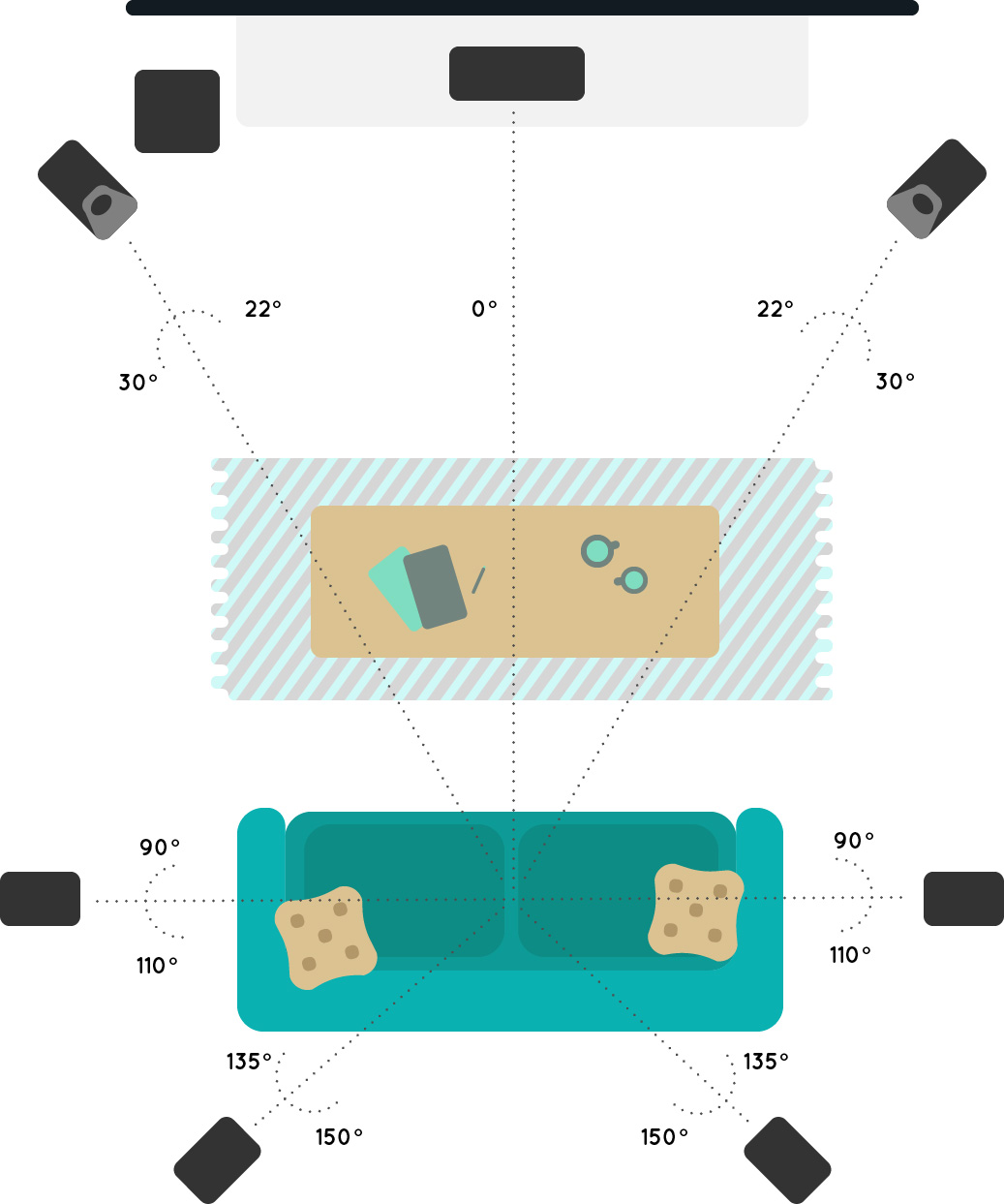
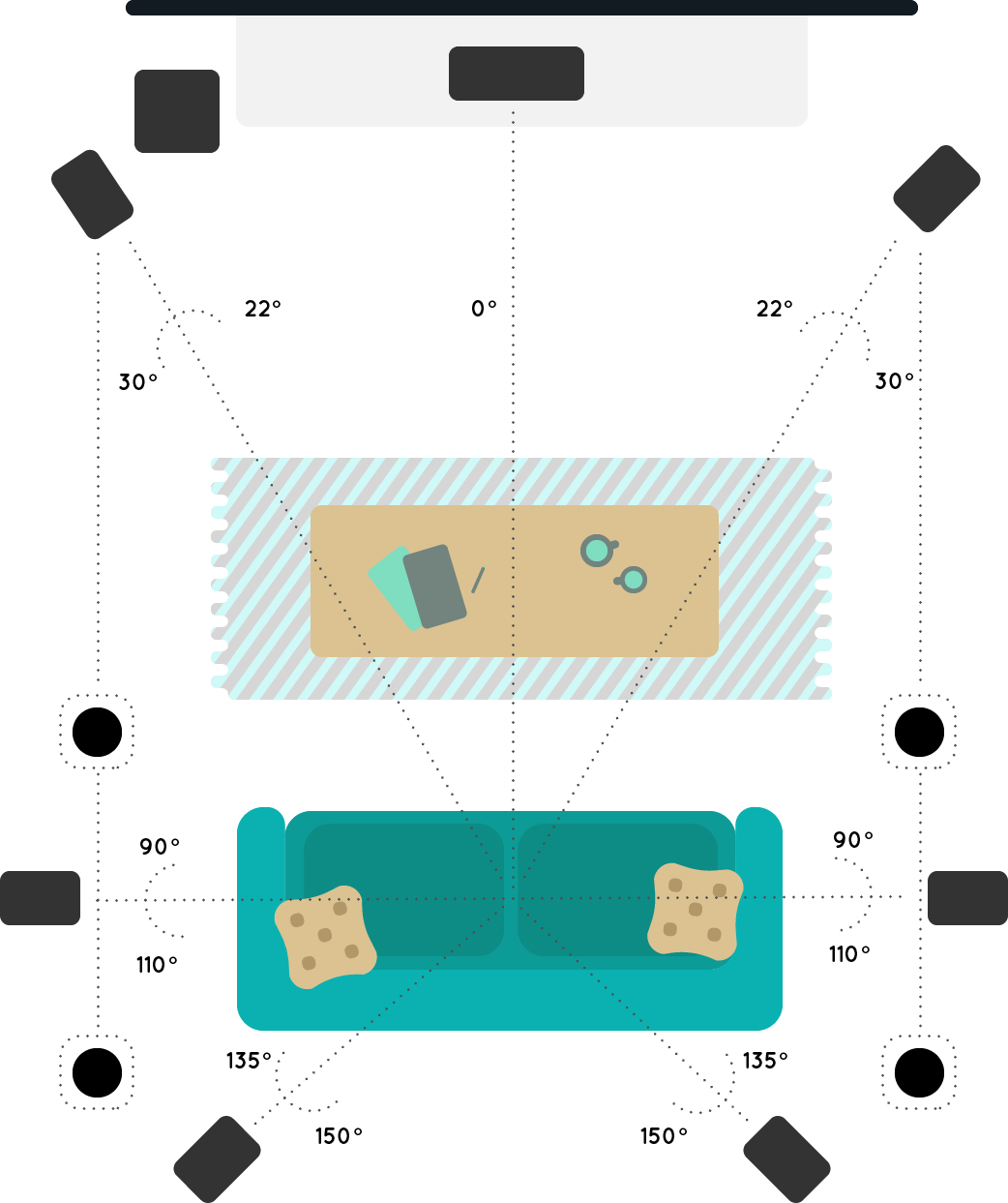
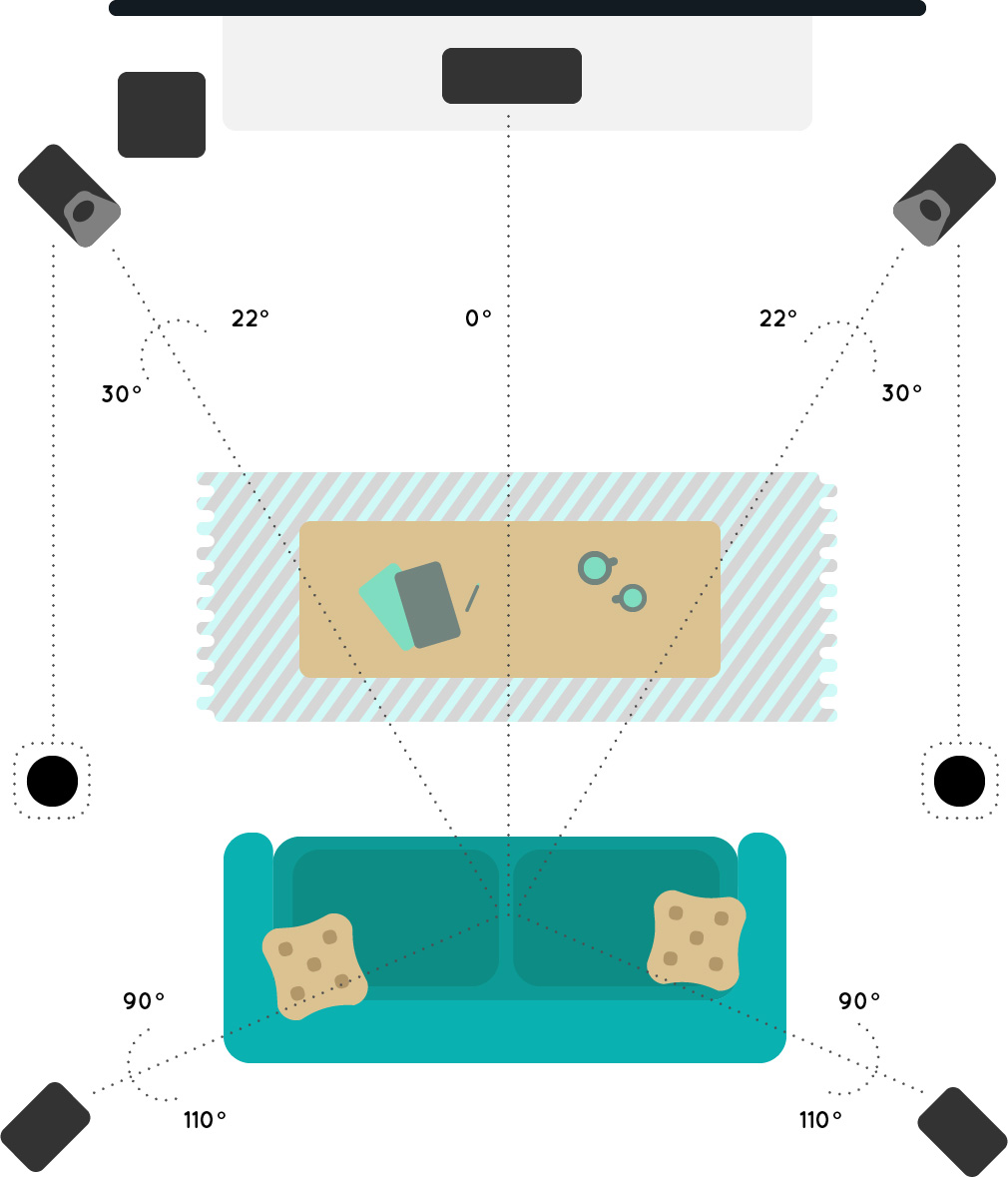
5.1.2 Setup

In this setup, there is a total of 5 traditional surround sound speakers plus 1 subwoofer and includes either 2 Dolby Atmos enabled speakers or 2 add-on modules.

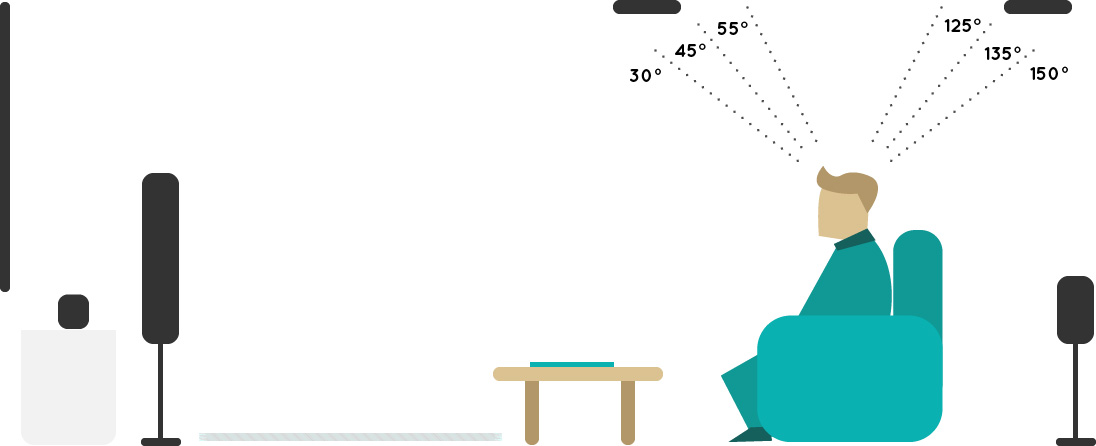
For ceiling speakers, it’s a total of 5 traditional surround sound speakers plus 1 subwoofer and 2 additional ceiling speakers.  

Dolby Atmos enabled speakers/add-on modules

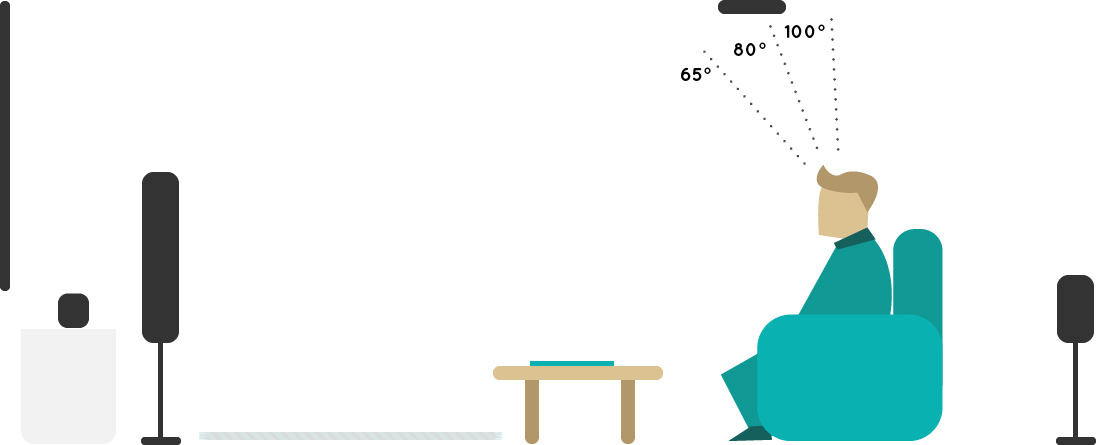
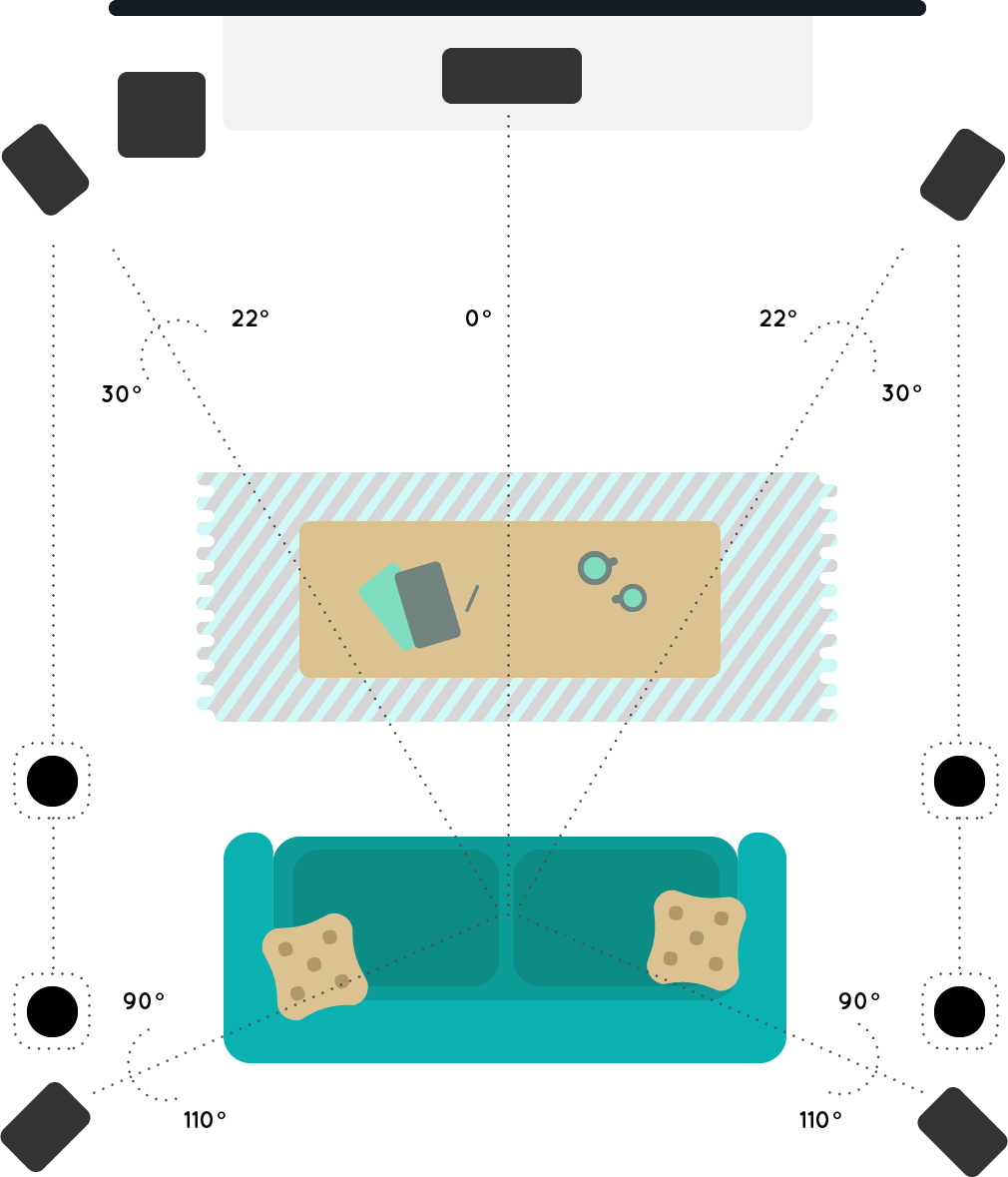
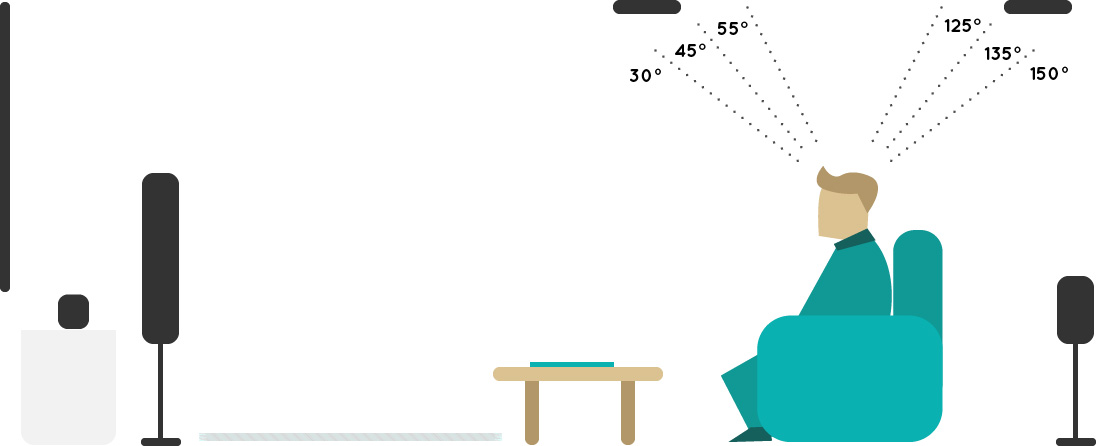
Please Note: The angles in the diagrams below represent the optimal speaker placement range relative to your listening position.
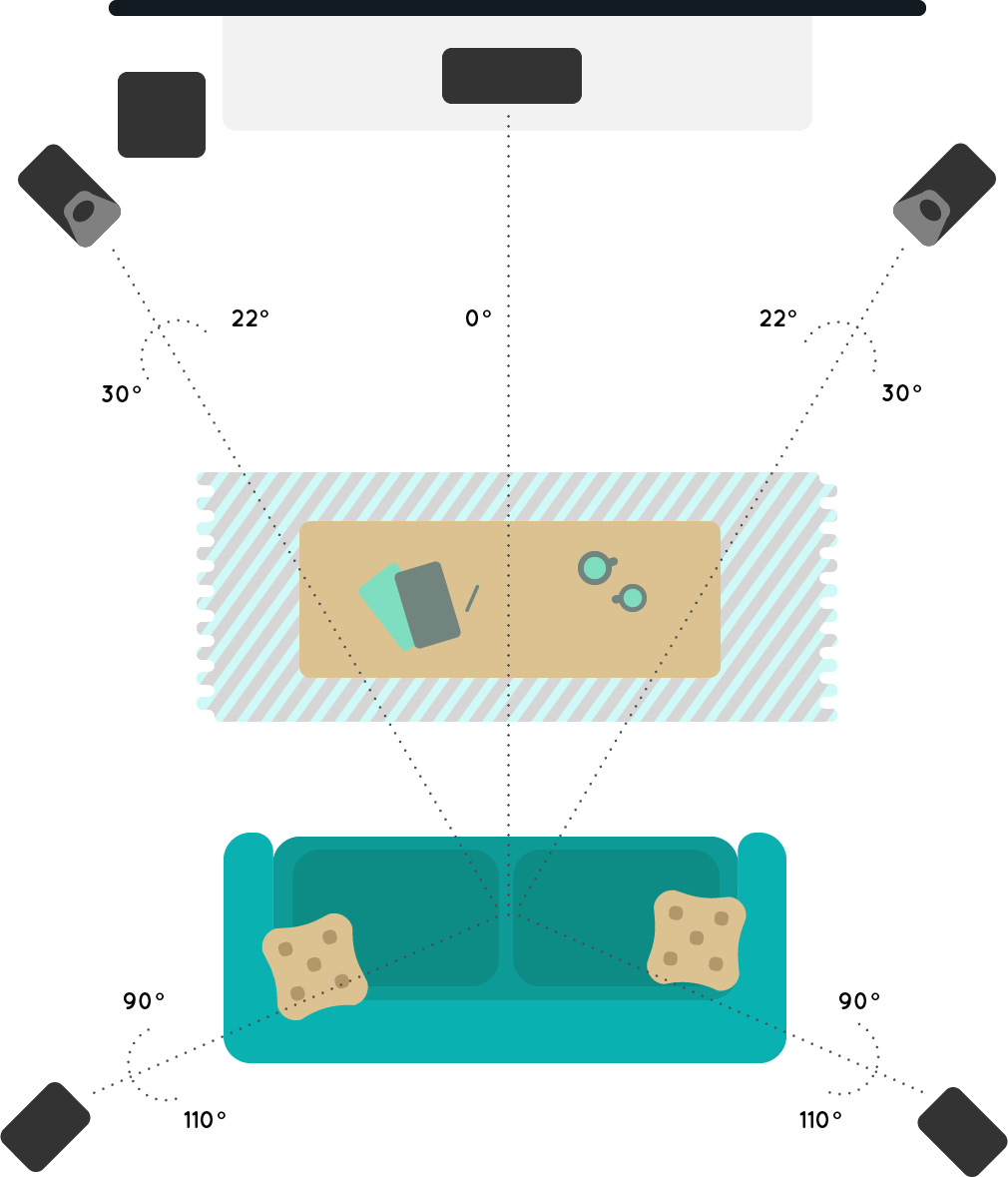
 

For Dolby Atmos enabled speakers, place them at the left and right front locations.

For add-on modules, place them on top of the left and right front speakers.

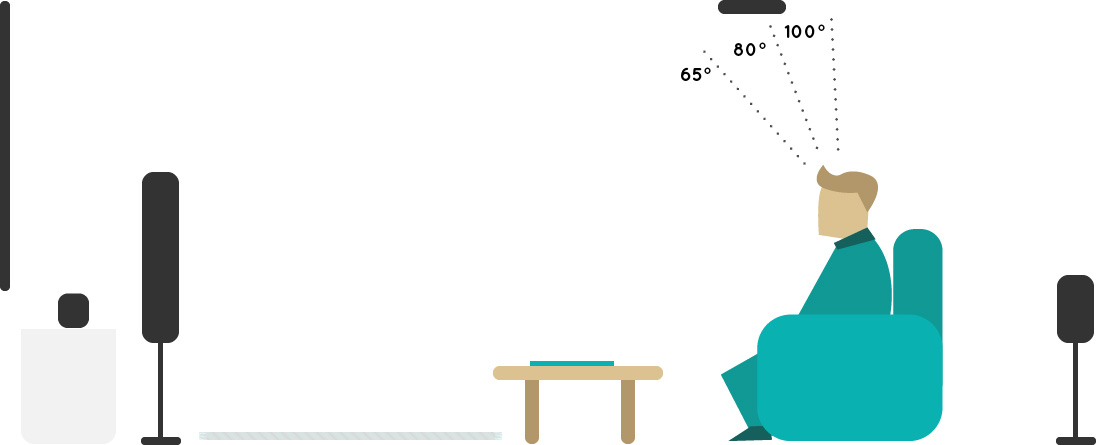
Ceiling speakers
 

The ideal ceiling height is between 7.5 and 12 feet.


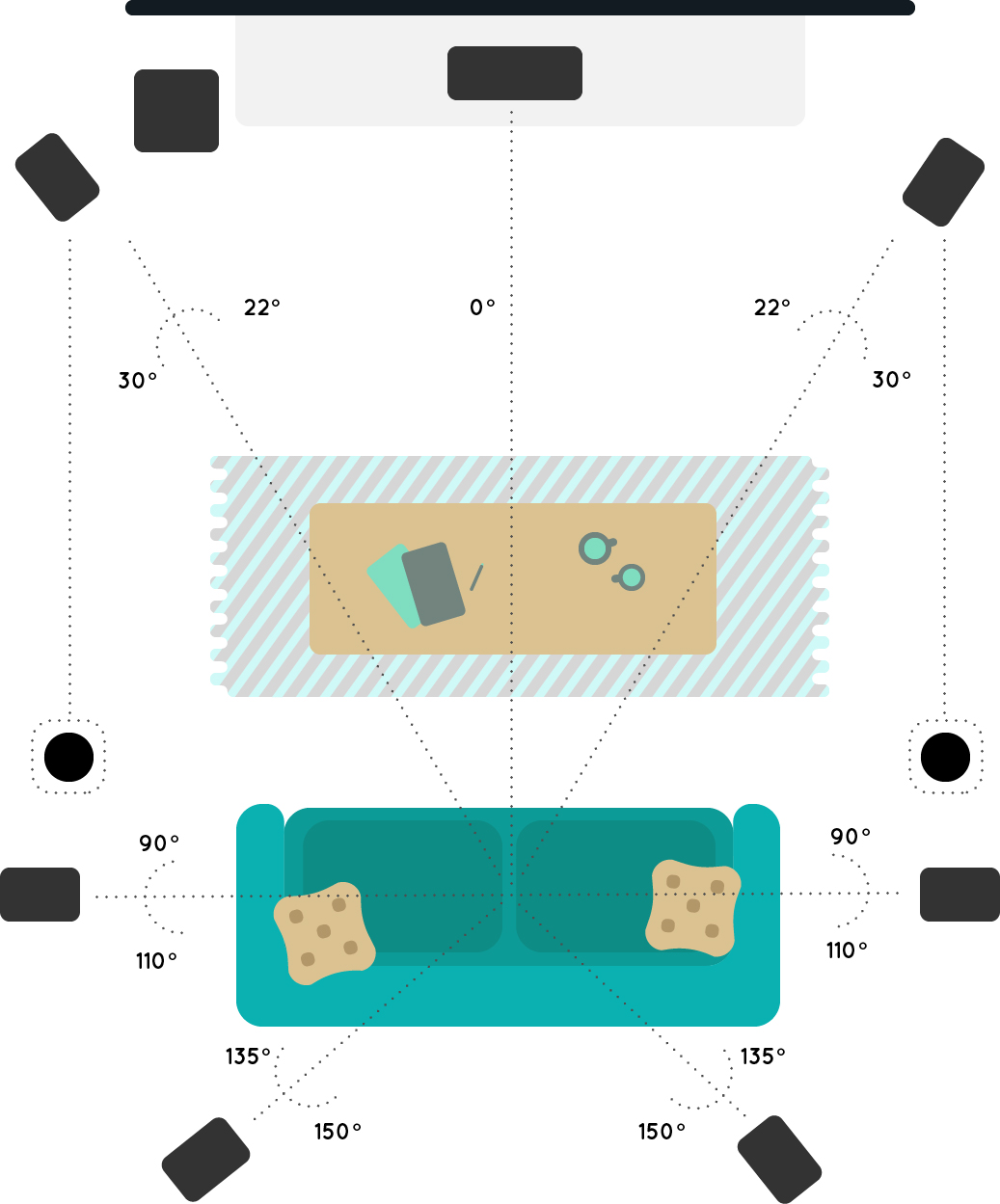
5.1.4 Setup

In this setup, there is a total of 5 traditional surround sound speakers plus 1 subwoofer and includes either 4 Dolby Atmos enabled speakers or 4 add-on modules.

For ceiling speakers, it’s a total of 5 traditional surround sound speakers plus 1 subwoofer and 4 additional ceiling speakers.

Dolby Atmos enabled speakers/add-on modules
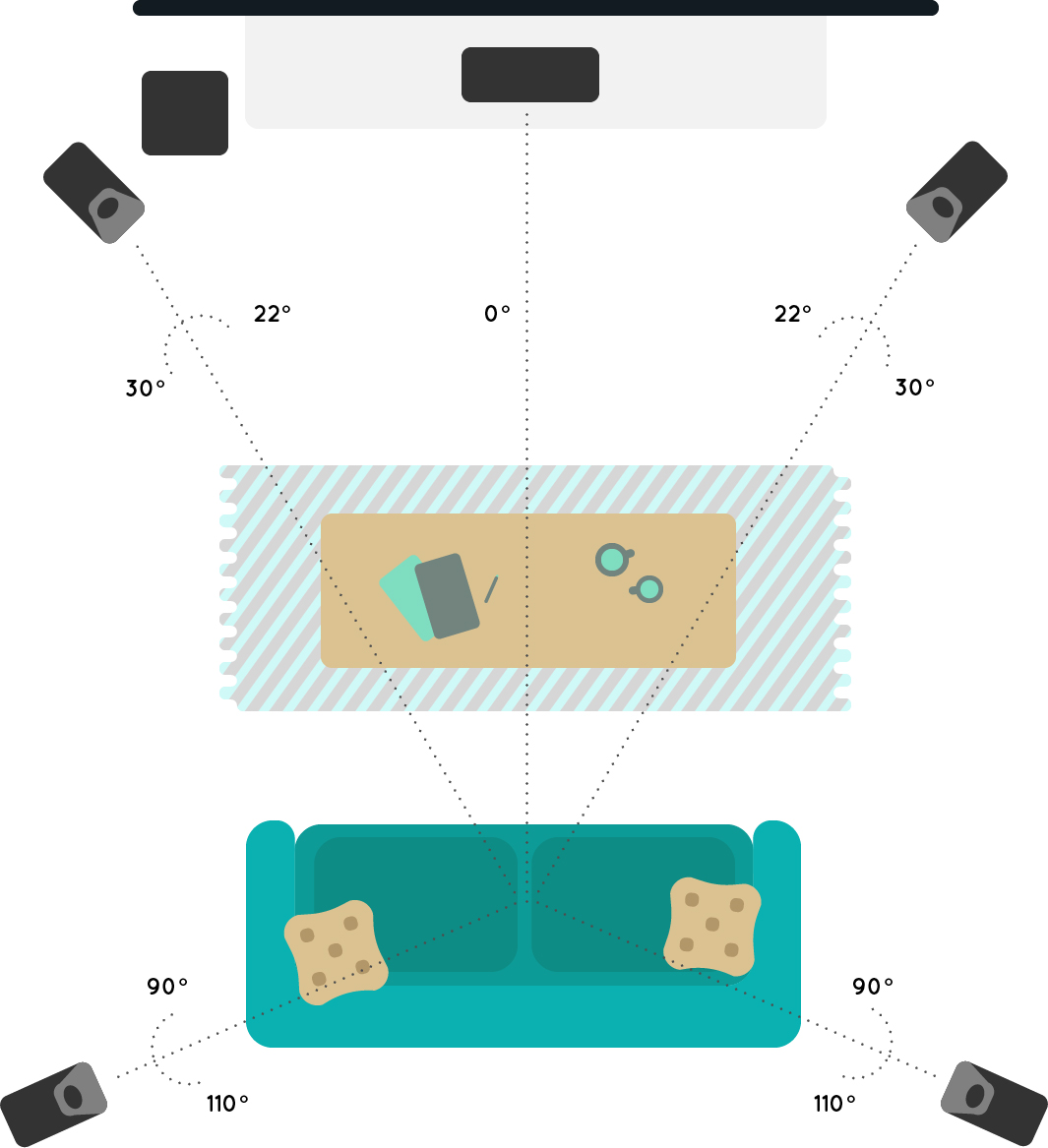
 

For Dolby Atmos enabled speakers, place them at the left and right front locations and at the left and right surround locations.

For add-on modules, place them on top of the left and right front speakers as well as the left and right surround speakers.

Ceiling speakers


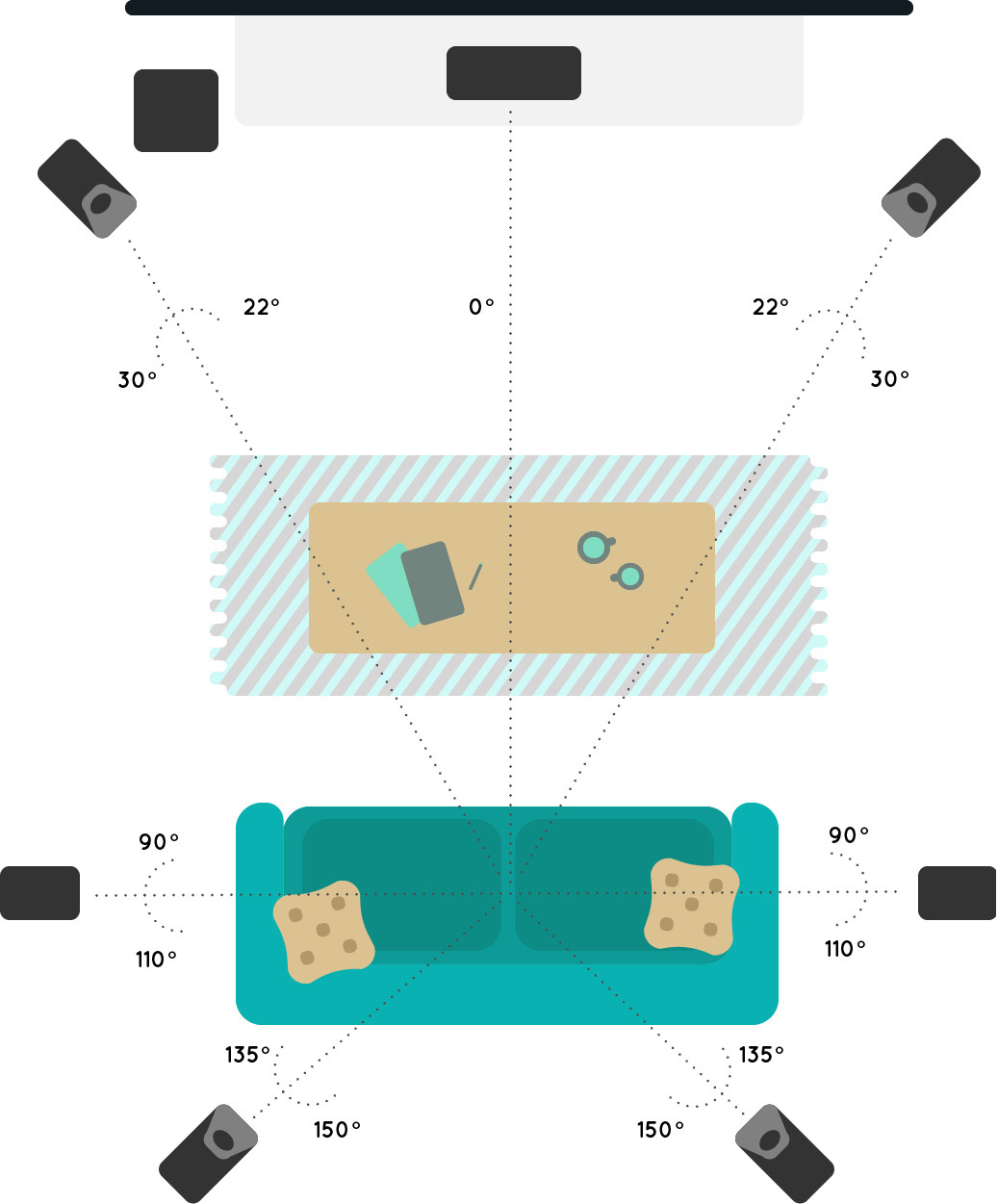
7.1.2 Setup

In this setup, there is a total of 7 traditional surround sound speakers plus 1 subwoofer and includes either 2 Dolby Atmos enabled speakers or 2 add-on modules.

For ceiling speakers, it’s a total of 7 traditional surround sound speakers plus 1 subwoofer and 2 additional ceiling speakers.

Dolby Atmos enabled speakers/add-on modules


For Dolby Atmos enabled speakers, place them at the left and right front locations.

For add-on modules, place them on top of the left and right front speakers.

Ceiling speakers


7.1.4 Setup

In this setup, there is a total of 7 traditional surround sound speakers plus 1 subwoofer and includes either 4 Dolby Atmos enabled speakers or 4 add-on modules.

For ceiling speakers, it’s a total of 7 traditional surround sound speakers plus 1 subwoofer and 4 additional ceiling speakers.

Dolby Atmos enabled speakers/add-on modules


For Dolby Atmos enabled speakers, place them at the left and right front locations and at the left and right surround locations.

For add-on modules, place them on top of the left and right front speakers as well as the left and right surround speakers.

Ceiling speakers


Dolby Atmos Content

Most new Blu-ray players will be capable of playing Dolby Atmos-enabled Blu-ray discs.

For streaming services, you can now enjoy Dolby Atmos Netflix with selected titles supporting the new sound format. From October of this year, Apple TV 4K will also roll out the biggest range of Dolby Atmos movies anywhere.

Be sure to check out our shop soon for our range of Dolby Atmos speakers and soundbars.

 

Philips Command vs Fusion

A head-turning digital signage is nothing without the right software to manage it.

You’ve got amazing content ready to captivate your customers but where do you actually start? What’s the best way to manage and update all your content onto your digital signage screen without having to resort to the old-fashioned USB stick?

There are 2 software options with our digital signage screens:

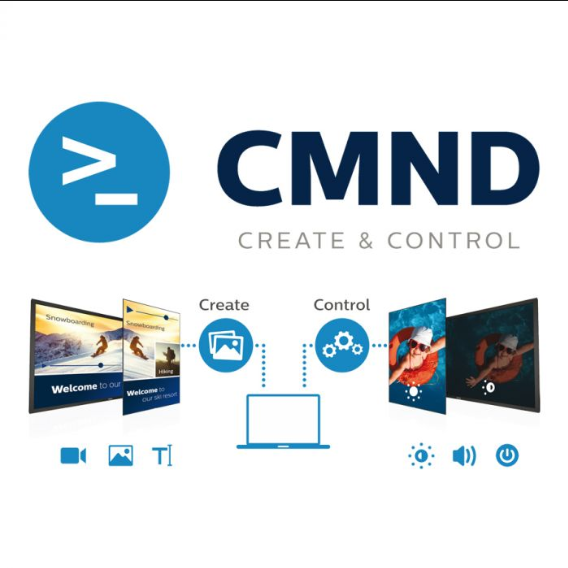
  • Philips CMND
  • Fusion Signage

We get asked a lot about these two options so without further ado, here’s a handy guide that explains what they can do as well as their plus sides and limitations to help you choose the right software.


What They Are


The Philips Command and Fusion Signage are both CMS (content management system) software designed to help you control and manage what you display on your digital signage screens.

They both allow you to:

  • Upload media files and images
  • Create playlists and schedules
  • Control several screens from one computer

They both use a web-based interface that isn’t compatible with Internet Explorer so you will need Mozilla Firefox or Google Chrome to run them.


Philips CMND


Pros

  • It’s free! All of our Philips digital signage screens come built-in with Philips CMND.
  • Philips CMND has its own tool to give you some control on how to display your content. Using an intuitive drag and drop interface, you can add a dash of creativity to your content like adding scrolling text above an image or running a video alongside a static image.


Limitations

Accessibility is limited. The software can only be installed on ONE computer that’s within the same network as the screens. This means you won’t be able to access the screens remotely from another network.

There is a workaround which involves setting up remote access to the computer that has CMND software installed. However, this can be a little tricky if you’re not the most tech-savvy.


Fusion Signage


Pros

  • Fusion Signage is built entirely as a cloud-based solution. This means you can access it from any computer anywhere and anytime (it does not have to be on the same network).
  • Can be accessed from more than one computer.  
  • It’s super simple to use with just three simple steps to have your screens connected and displaying content.

Limitations

  • You will have to pay to use Fusion Signage. It’s not free like Philips CMND but if you place value on nationwide coverage and accessibility from any computer, a once-off fee starting from $299 for a 3-year licence is actually very cost-effective.


So Which One is Right for You?

If you’re looking for free software with basic content editing and you don’t need remote access, Philips CMND will get the job done.

If you’re looking for software that gives you the freedom to manage your content from anywhere on any computer, and you don’t mind a low once-off fee or need to edit any content, go with Fusion Signage.

For any questions about digital signage or their software options, contact us on 1300 556 212. You can also check out our range of digital signage screens here.

Interactive Projectors vs Interactive Displays

Move over whiteboards. Display technology has transformed the world of presenting and instructing. It’s making learning more fun, interactive and ultimately, more engaging.

We get asked two questions a lot by educational institutions and businesses – “what is the difference between an interactive projector and an interactive display?” This is usually followed by “…and which one should we go with?”

The right display tech for you will depend on several factors, all of which we’ll cover below.

So it’s time to set the record straight. Notebooks out, eyes at the front please.

What is an Interactive Projector?

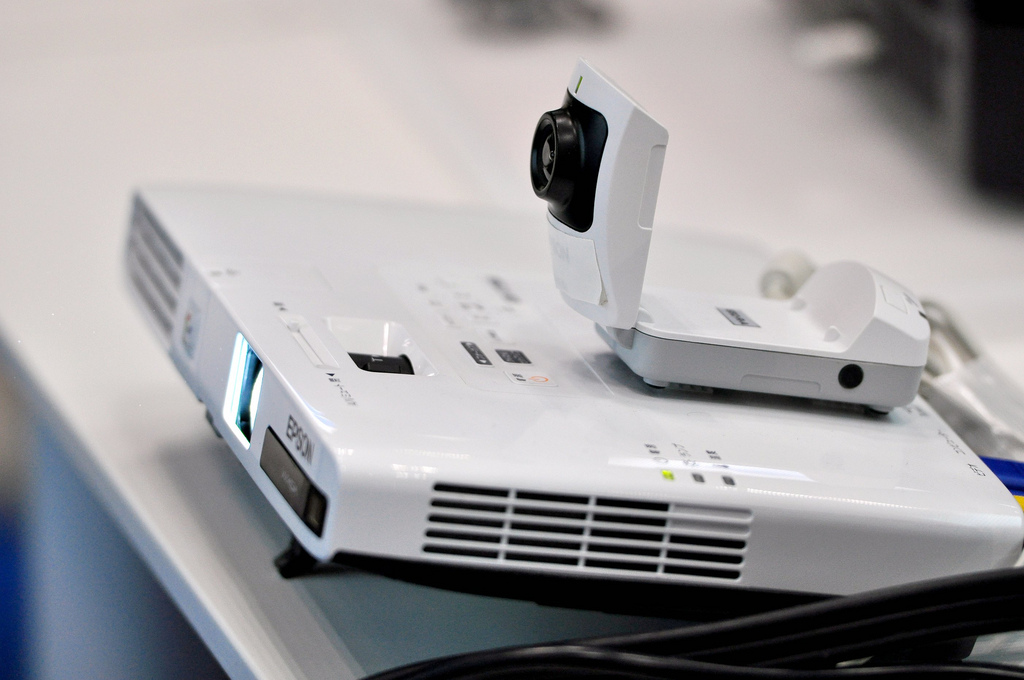
An interactive projector involves a projector and a whiteboard. The projector is the source of content being displayed and is usually mounted to the ceiling or wall. The whiteboard acts as the screen to display the projected content.

Sounds like a normal projector set up right? Wrong. Here’s where it gets exciting for the classroom or boardroom. You can actually interact with the projected content using an interactive pen or even with your fingers.



This is made possible by tech such as infrared or digital light processing that can track movements when contact is made with the whiteboard.


Now you can annotate to your heart’s content!

What is an interactive Display?

An interactive display is a screen with touchscreen interaction. Think of it as a really really big tablet. Like interactive projectors, the screen will respond to finger touch or a stylus.

 

Display Size

Size is arguably the most important factor. You must consider your audience. For schools, the minimum recommended screen size in a standard classroom is 70”. Anything smaller and you run the risk of students not being able to read the content.



With this in mind,
interactive projectors have a huge advantage in that they’re capable of projecting an image as large as 100”.

Functionality

Interactive projectors usually require a connection to an input source like a laptop, PC or tablet. However, higher end models like the Epson MeetingMate range have both PC free whiteboard and annotation functions.

In contrast, most interactive displays already act like computers and therefore won’t need to connect to other devices. An example of this is the InFocus JTouch Series displays.

Whether it’s an interactive projector or display, choosing one that doesn’t need a connection to other devices ultimately means an easier set up and less training required.

Image Quality

Interactive displays will generally offer a crisper, brighter and more colourful image than interactive projectors.

If you do opt for an interactive projector, consider these factors. The image quality will diminish over time due to the finite nature of projector lamps. An interactive projector will also deliver better image quality under darker environments. Having blinds closed or lights turned off may not always be ideal for audience interaction particularly in classrooms.


Maintenance

While an interactive display has a higher initial cost, it evens out when you factor in the maintenance costs of interactive projectors. These include lamp and filter replacements.

If minimal upkeep is what you’re after, an interactive display will be the better choice.

Now that you’ve done your homework, it’s time to browse our range of interactive displays and interactive projectors.

Got other questions? Great. Call us today on 1300 556 212 for all the answers.

Go to Top